




Description
Large conference rooms don’t have to be one-size-fits-all. The HP Poly Studio G62 gives IT directors and facilities managers the freedom to build exactly the video system your space needs—without the headaches of complex wiring or limited processing power. This compact Android-based codec snaps into place with magnetic mounts and PoE+ power, then seamlessly connects Poly cameras, microphones, and even certified third-party gear over Ethernet or USB. You get crisp 4K video, smart AI framing and noise blocking, dual-monitor support, and native Microsoft Teams or Zoom Rooms experiences—all in one flexible, future-proof platform.
The Telecom Spot Take
Here’s the real-world win our customers love most about the Studio G62: it solves the “I wish we could just add one more mic or camera” problem that plagues so many fixed all-in-one systems. Because it’s modular and powered by PoE+, you can place the compact codec behind a display, under a table, or in an AV rack and expand the room later without ripping out cabling. DirectorAI keeps everyone perfectly framed no matter where they sit, while NoiseBlockAI keeps the conversation crystal clear even with HVAC humming or side chatter. IT teams get HP Poly Lens for remote management, and facilities managers appreciate the clean install and TAA-compliant options (99T10AA#ABA and 99T12AA#ABA). Whether you run Microsoft Teams Rooms, Zoom Rooms, or a BYOD setup, the G62 scales with your business instead of forcing you to compromise.
Key Features
- PoE+ power and magnetic mounts – Install in minutes behind screens, under tables, or in racks with zero extra power adapters or messy cables.
- DirectorAI camera framing & tracking – Automatically follows speakers or frames the whole group so every participant feels seen (pairs with supported Poly IP or USB cameras).
- NoiseBlockAI – Keeps background noise out of the call while preserving natural voices—ideal for busy office environments.
- Dual 4K HDMI outputs – Run far-end video on one screen and content on another for professional presentations.
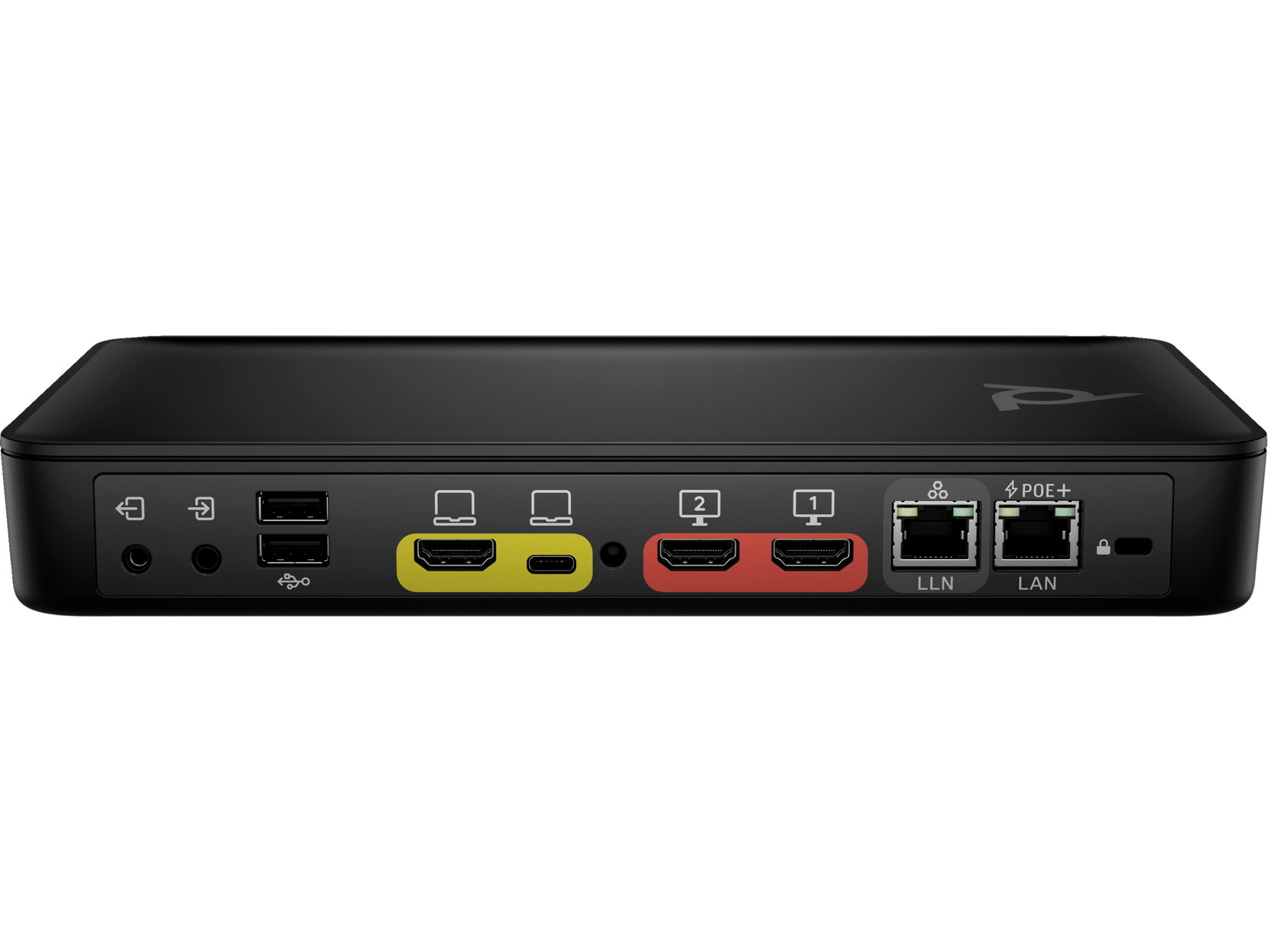
- Flexible connectivity – LLN Ethernet port for Poly IP peripherals, multiple USB ports, HDMI in/out, and USB-C with DisplayPort Alt Mode for single-cable laptop sharing.
- Native Microsoft Teams & Zoom Rooms – Jump straight into your favorite platform with no extra PC or dongle required.
- HP Poly Lens management – Remote insights, updates, and control for one room or an entire fleet.
- TAA-compliant variants available – Choose 99T10AA#ABA or 99T12AA#ABA (no-radio model) for government and secure environments.
Technical Specifications
| Category | Details |
|---|---|
| Processor & OS | Android-based codec running Poly VideoOS |
| Video | Up to 4K30 fps output; Dual 4K HDMI out; HDMI input for content sharing; USB-C DP Alt Mode |
| Audio | 3.5 mm line-level in/out; NoiseBlockAI; supports up to 3 Poly IP microphones or certified 3rd-party DSP via USB |
| Connectivity | PoE+ (802.3at Class 4); LLN RJ-45 port for IP peripherals; 2× USB-A 5 Gbps; 1× USB-C 5 Gbps (DP Alt Mode); 2× HDMI 2.0 out; 1× HDMI 2.0 in; Kensington lock |
| Mounting & Power | Magnetic mounts; PoE+ powered (no separate adapter needed); compact design fits behind displays or in racks |
| Supported Peripherals | Poly Studio E70/E60/E360 cameras (IP/USB); Poly IP microphones; Poly TC8/TC10 touch controllers; Poly Trio C60 speakerphones (up to 4); certified 3rd-party USB cameras & DSPs |
| Dimensions | 13.75 in. W × 1.5 in. H × 5.5 in. D (34.92 cm × 3.81 cm × 13.87 cm); 2.1 lbs (0.95 kg) |
| Certifications | Microsoft Teams Certified; Zoom Certified; TAA options available |
| Variants | 99T09AA#AC3 (standard); 99T10AA#ABA (GSA/TAA); 99T12AA#ABA (No Radio, GSA/TAA) |
Frequently Asked Questions
Can I use existing third-party cameras and microphones with the G62?
Yes—USB cameras and certified third-party DSPs connect directly; Poly IP peripherals use the dedicated LLN Ethernet port for clean, powered integration.
Does the system support dual monitors?
Absolutely. Two 4K HDMI outputs let you show far-end video on one screen and content on the second.
How does installation compare to all-in-one video bars?
Much simpler and cleaner. Magnetic mounts plus PoE+ mean you can hide the codec out of sight and run a single Ethernet cable for both power and data.
Is the G62 Microsoft Teams and Zoom certified?
Yes—native experiences for both platforms with no extra hardware required.
Which variant should I choose for a government facility?
99T10AA#ABA or 99T12AA#ABA both offer TAA compliance; select the no-radio model (99T12AA#ABA) if your security policy prohibits Wi-Fi/Bluetooth radios.
Can IT manage multiple G62 systems remotely?
Yes—HP Poly Lens gives you cloud-based visibility, updates, and analytics across your entire deployment.