




Description
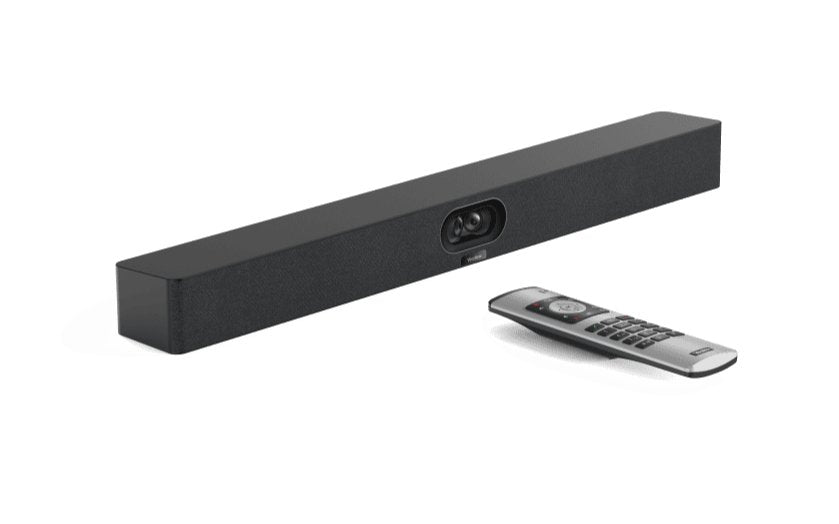
Yealink MeetingBar A40 with VCR11 Remote – All-in-One Android Collaboration Bar
The Yealink MeetingBar A40 is a powerful all-in-one video collaboration bar designed for small to medium meeting rooms. Its dual 48MP camera system delivers clear, natural video with IntelliFocus, Auto Framing, Speaker Tracking, Multi-focus Framing, and Smart Gallery (Zoom Rooms only) to ensure every participant is visible and well-framed.
Dual 48MP Cameras with Intelligent Framing
The A40 automatically adjusts to who is speaking and how participants are positioned in the room. Whether one person is presenting or a full group is collaborating, the system optimizes framing and clarity without manual camera control.


Clear, Room-Filling Audio
The built-in 8-MEMS microphone array delivers a 6-meter pickup range with advanced background noise reduction, while the dual 10W forward-facing speakers provide rich, natural voice clarity. For larger tables, add up to two expansion microphones (sold separately).
Simple and Flexible Deployment
Run native Microsoft Teams Rooms or Zoom Rooms right on the bar — no dedicated PC required. The A40 also supports BYOD USB mode and General Mode (SIP/H.323), giving you flexible meeting workflows across platforms.

Key Features
- For Small & Medium Rooms — Typically supports 6–11 people.
- Dual 48MP Cameras — Auto Framing, Speaker Tracking, IntelliFocus.
- Smart Gallery — Zoom Rooms only.
- 8-MEMS Mic Array — 6 m pickup with AI noise suppression.
- Native Teams Rooms & Zoom Rooms — Plus BYOD and SIP/H.323 modes.
- MDEP-aligned — Secure deployment with centralized management.
- Expandable Audio — Supports up to two wired/wireless mic pods.
Datasheet & Full Specifications
For complete technical details, see the Yealink MeetingBar A40 Datasheet (PDF) or review the specifications in the table below.
Looking for the version with a touch panel for one-touch join control? View A40-031 Bundled with CTP25 →
Package Contents (A40-010)
- MeetingBar A40 Collaboration Bar
- HDMI Cable × 2
- Network Cable × 1
- TV-Clip Mount × 1
- Wall Mount × 1
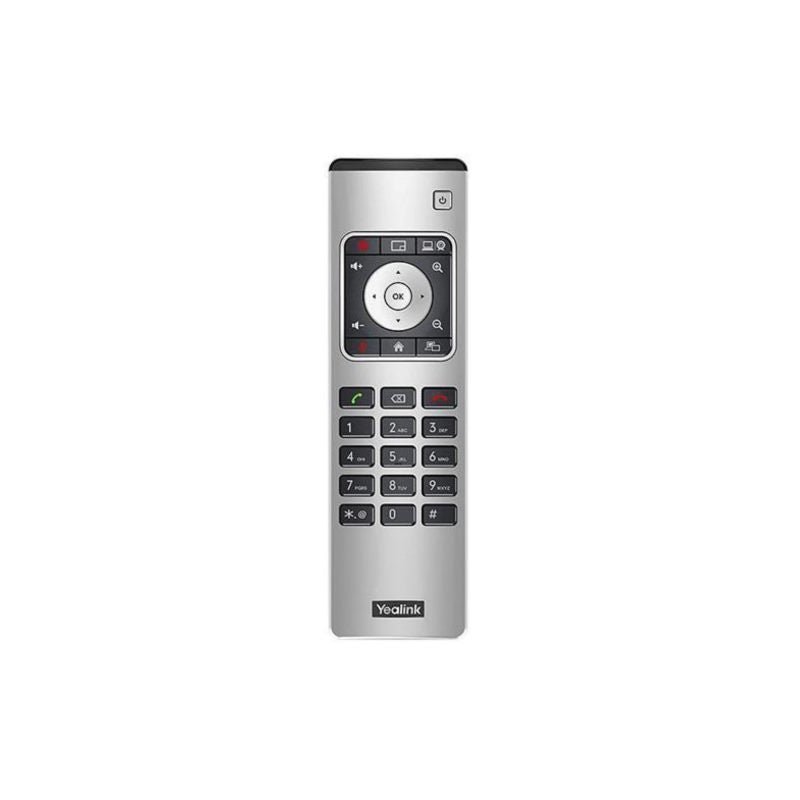
- VCR11 Remote Control
Remote Control Guide
See the Yealink VCR11 Remote Control Guide (PDF) for quick reference on call control, layout switching, and camera framing.
Detailed Specifications
| Parameter | Description |
|---|---|
| Operating System | • Android 13 |
| Camera | • Maximum pixels: 2*48MP pixels • Number of preset positions: 9 • Electronic gimbal • 120° DFOV, 54° VFOV, 110° HFOV • Depth of field: 1-5 meters • 6x digital zoom • Maximum resolution: 4K • Maximum frame rate: 60FPS • Video output resolution: 4K60fps, 1080P60fps • Effective focal length: 4.2 mm • Aperture: F/2.2-F/2.4 • Supports wide dynamic range • High dynamic range imaging: 10-bit • Supports auto exposure • White balance: ATW/auto/manual • Shutter speed: 10ms-33ms • Minimum illumination: 0.5 lux (daytime), 0.1 lux (nighttime) • Signal-to-noise ratio: >63 dB • Privacy cover: Electric lens cap • Lens calibration • Intelligence Features - IntelliFocus - Auto Framing - Speaker Tracking People counting - Picture in Picture - Multi-focus Framing - Smart Gallery (Zoom only) • Number of cameras: 2 |
| Speaker | • Built-in 2 x 10W speakers • Maximum sound pressure level: 112dBSPL 10W@0.1m • Frequency response: 100-16kHz • Sensitivity: 86dB SPL @ 1W @ 0.5 meter • Sampling rate: 48kHz • Sound emission angle: Forward-facing • Total Harmonic Distortion (THD): at 10W, 1kHz, <5% • Rated impedance: 4 ohms • Maximum power: 12W • Rated power: 10W |
| Microphone | • Built-in 8 MEMS microphone array • 6-meter pickup distance, 4-meter high-quality pickup distance • Signal-to-noise ratio: 72dB • Maximum sound pressure level: 130dBSPL (whole device), 100dBSPL (individual microphone) • Dynamic range: 28-100dBSPL • Sensitivity: -38dBV/pa • Frequency response: 100-20kHz • Sampling rate: 48K32bit • Bit depth: 32-bit |
| Resolution | • Portrait resolution: up to 4K30fps • Bandwidth requirement: 10Mbps or more |
| Content sharing | • Up to 4K15 in General Mode • Teams: 1080p in meeting, 4K local sharing • Zoom: 1080p |
| Communication standard protocol | • SIP/H.323 in General Mode |
| Network Protocol | • Wi-Fi 6 - 2.4G & 5G dual-band, 802.11a/b/g/n/ac/ax - 2x2 MIMO • Bluetooth 5.0 • TCP/IP (IPv4/IPv6), DHCP/static IP • HTTPS secure web access |
| Configuration Management | • Automatic configuration via web page/display/AutoP • Firmware upgrade, factory reset • Configuration import and export • System log export |
| Device Management | • Yealink Https Web Portal • Yealink Device Management Platform • Yealink Management Cloud Service • Microsoft Device Management Platform(Microsoft Teams Admin Center/Intune) • Zoom Device Management |
| Installation | • Wall mount • Use TV-Clip Mount • Place on the desktop |
| Ports | • 1x USB2.0 USB-A port • 1x USB-C port • 1x Ethernet port • 1x Yealink VCH port (RJ-45) • 1x 3.5mm Line-in & Line-out port • 1x Power port • 1x Security lock slot • 1x Reset slot • 2x HDMI-out |
| Environmental Factor | • Operating humidity: 10 - 95% • Operating temperature: 0 - 40°C |
| Dimensions and weight (W × D × H) | • MeetingBar A40: 650 × 62 × 80 mm • N.W/CTN: 5.540 kg • G.W/CTN: 6.086kg |
Frequently Asked Questions
What is included with the A40-010 bundle?
The A40-010 bundle includes the Yealink MeetingBar A40 collaboration bar and the VCR11 remote control. This setup is designed for rooms where participants prefer to operate the system via handheld remote rather than a touch console.
What room size is the MeetingBar A40 designed for?
The A40 is recommended for small to medium meeting rooms, typically supporting 6–11 participants. Its dual 48MP camera system and advanced microphone pickup ensure clear video and audio across the space.
Does the MeetingBar A40 support Microsoft Teams and Zoom?
Yes, the A40 is certified for Microsoft Teams Rooms and also compatible with Zoom Rooms. Smart Gallery is supported in Zoom Rooms only. Multi-stream IntelliFrame with Copilot is supported in Microsoft Teams Rooms on Windows (MTR-W) only.
How does the VCR11 remote control work with the system?
The included VCR11 remote enables users to control the MeetingBar A40 from the table or display area. It handles camera framing, volume, layout switching, call mute/unmute, and other management without needing a laptop in the room.
Can the system be expanded with additional microphones?
Yes. The A40 supports up to two expansion microphones, such as the VCM35 or VCM36 series, to extend coverage for larger tables or wider room layouts.
Is the A40 easy to install and manage?
Yes. The A40 supports simple wall, display, or tabletop mounting and can be managed remotely through the Yealink Device Management Platform (YDMP) for firmware updates, configuration, monitoring, and centralized administration across multiple rooms.
How do I choose between the A40-010 and A40-031 bundles?
Choose A40-010 if your meeting rooms typically start calls from a laptop (BYOD workflow) and simple remote-based camera/audio control is sufficient.
Choose A40-031 if you want a shared in-room control interface with one-touch join, camera controls, and meeting layout management via the CTP25 touch panel.