




Description
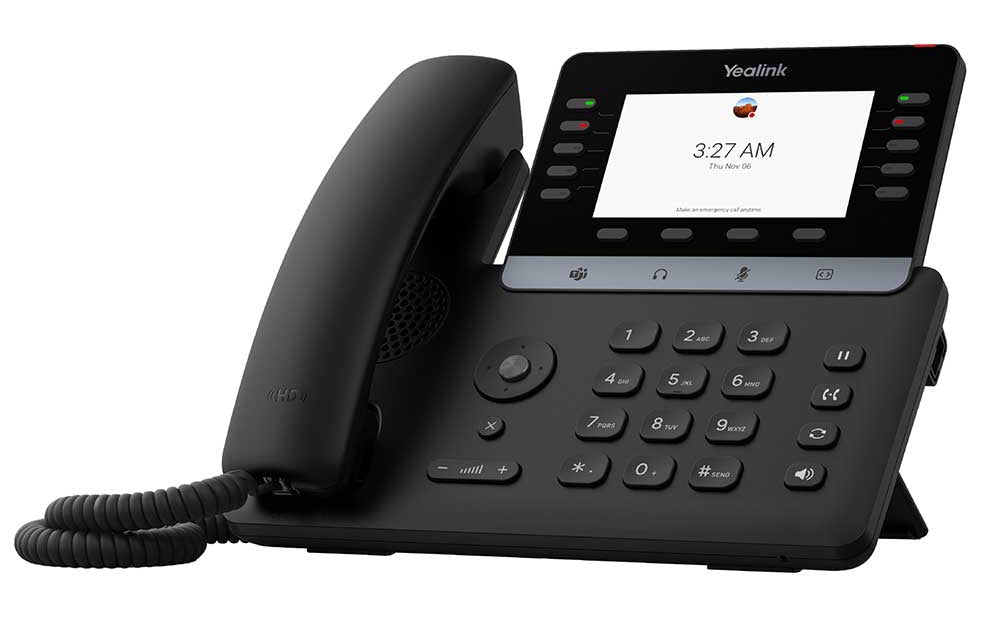
The Yealink MP55 E2 Microsoft Teams Phone is purpose-built for vertical industries where fast, reliable, and crystal-clear communication keeps operations running smoothly every day. At the front desk you get touch controls and one-touch dialing that cut delays. In noisy education areas or busy call centers the 3W speaker and AI noise filtering ensure every word comes through loud and clear. Hard keys for Hold, Transfer, and Redial let agents handle high-volume calls with confidence.
The Telecom Spot Take
Here’s the bottom line for IT directors, facilities managers, and business owners: the MP55 E2 gives you a secure, easy-to-manage Microsoft Teams phone that actually fits real-world vertical use cases. Android 15 and the Microsoft Device Ecosystem Platform (MDEP) deliver fast performance plus enterprise-grade security right out of the box. Wi-Fi 6 means fewer cables and rock-solid connections even in crowded buildings. Bulk management through Microsoft Teams Admin Center or Yealink Management Cloud Service gives you real-time alerts on call quality or firmware issues—so you spend less time troubleshooting and more time growing the business. If you need a phone that’s simple for staff yet powerful enough for IT, this is it.
Key Features
- Android 15 operating system – Faster response times and a smooth, modern interface that keeps daily workflows moving without lag.
- Built on Microsoft Device Ecosystem Platform (MDEP) – Enterprise-level security and seamless Teams integration you can trust for compliant, protected calls.
- 4.3-inch non-touch color screen – Clear, easy-to-read display that shows call status and navigation at a glance—perfect for high-traffic desks.
- Optimal HD audio with AI Noise Cancellation – Background noise disappears so conversations stay crisp even near busy hallways or open offices.
- 3W speaker with full-duplex technology – Loud, clear hands-free audio that everyone in the room can hear and join.
- Dedicated Microsoft Teams button – One-touch access to meetings, chat, and collaboration tools so your team stays productive.
- Magnet handset – Secure, comfortable handset that stays put and supports high-quality audio for private calls.
- Built-in dual-band 2.4G/5G Wi-Fi 6 & Bluetooth 5.0 – Flexible wireless setup with fast, reliable connectivity—no extra adapters needed.
- USB Type-A port – Plug in your favorite USB headset for private conversations or added comfort during long calls.
- Dual-port Gigabit Ethernet with PoE support – Simple network and power over a single cable; ideal for clean desk installations.
- Hard keys for Hold, Transfer, and Redial – Speed up high-volume calling so agents handle more calls confidently and keep customers happy.
- Hybrid mode & professional management – Easy bulk deployment and real-time monitoring via Microsoft TAC and Yealink YMCS.
Technical Specifications
| Category | Details |
|---|---|
| Operating System | Android 15 |
| Display | 4.3-inch non-touch color screen (480 x 272 resolution) |
| Audio | Optimal HD voice, AI Noise Cancellation, 3W speaker, full-duplex hands-free with AEC |
| Microsoft Integration | Built on Microsoft Device Ecosystem Platform (MDEP), dedicated Teams button |
| Network | Dual-port Gigabit Ethernet, IEEE 802.3af PoE (Class 3), built-in dual-band 2.4G/5G Wi-Fi 6 |
| Bluetooth | 5.0 |
| USB | 1 × USB Type-A port (supports USB headsets) |
| Handset | Magnet handset with HAC support |
| Management | Microsoft Teams Admin Center (TAC) and Yealink Management Cloud Service (YMCS) |
| Additional | Hybrid mode, 10 line keys with LED indicators |
Comparison at a Glance
- Vs. Yealink MP54 E2: MP55 E2 adds Android 15 (vs. 13), stronger AI noise cancellation, and Wi-Fi 6 for noisier vertical settings.
- Vs. Yealink MP56 E2: MP55 E2 offers a simpler non-touch screen and focused hard keys—ideal when you don’t need a large touchscreen but still want premium audio and security.
FAQ
Is the Yealink MP55 E2 fully certified for Microsoft Teams?
Yes—it’s built on the Microsoft Device Ecosystem Platform with a dedicated Teams button and native integration for a smooth experience.
Does it work without a wired network connection?
Absolutely. Built-in Wi-Fi 6 lets you deploy it wirelessly.
Can I use my existing USB headset?
Yes—the USB Type-A port supports most USB headsets for private calling.
How easy is it to manage multiple phones?
Very. Use Microsoft Teams Admin Center or Yealink YMCS for bulk updates, real-time alerts, and remote monitoring.
Is it suitable for noisy environments like schools or open offices?
Yes—AI noise cancellation and the 3W speaker keep every call clear even with background activity.
Does it support Power over Ethernet?
Yes—PoE (IEEE 802.3af Class 3) means one cable for power and data. Optional power adapter available.