




Description
Available in two variants: Microsoft Teams Edition and Zoom Edition – same powerful hardware, platform-native experience.
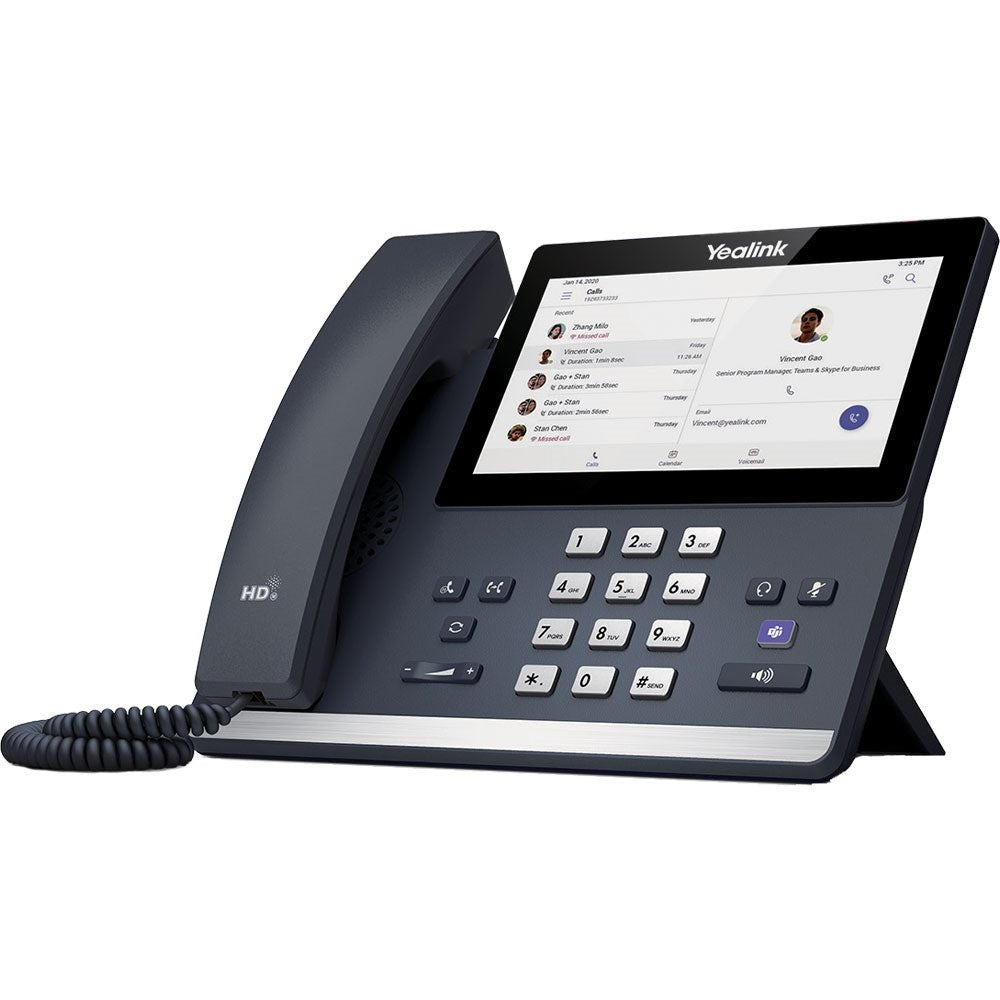
Need a rock-solid desk phone that actually feels native to your Microsoft Teams or Zoom environment? The Yealink MP56 E2 is exactly that. It gives you a big, clear 7-inch touchscreen, crystal-clear Optimal HD audio, and Android 13 smarts in a sleek, easy-to-use package. Whether your team lives in Teams or Zoom, this dedicated phone cuts out the clunky apps and delivers fast, professional calls every time – no laptop required.
The Telecom Spot Take
Here’s the real-world truth: most office phones try to do too many things and end up frustrating users. The MP56 E2 keeps it simple and powerful. Same hardware, two platform-optimized versions – one clicks straight into Microsoft Teams with a dedicated button, the other feels like a Zoom Room on your desk. IT directors and facilities managers love it because bulk deployment is painless (TAC or ZDM + YMCS), and business owners love the price-to-performance ratio. If you want reliable desk phones that match your UC platform without extra training or support tickets, this is the one.
Key Features
- 7-inch (1024 × 600) capacitive touchscreen – Large, bright, and anti-fingerprint coated so your team can navigate calls, contacts, and calendars with one finger.
- Optimal HD audio + Yealink Noise Proof Technology – Acoustic Shield, Smart Noise Filtering, loudness enhancement, AEC, and full-duplex speakerphone deliver clear conversations even in noisy open offices.
- HAC-compliant magnet handset – Easy to pick up, put down, and use for anyone, including team members who need hearing assistance.
- Touchable hard keys + dial pad – Old-school phone feel with modern speed – just press or tap to answer, hold, or transfer.
- Built-in Bluetooth 5.2 and dual-band Wi-Fi – Connect headsets wirelessly and stay online even if Ethernet isn’t perfect.
- Dual Gigabit Ethernet ports with PoE – Plug in once and power + data are handled; daisy-chain another device if needed.
- USB ports for headsets – Teams version adds USB-C; both support USB-A headsets for extra flexibility.
- Platform-native experience – Dedicated Microsoft Teams button and optimized interface (Teams version) or full Zoom-tailored UI and ZDM support (Zoom version).
- Enterprise-grade management & security – Microsoft TAC or Zoom Device Management + Yealink Management Cloud Service (YMCS) for bulk updates, real-time alerts, and rock-solid encryption.
- Wall-mountable (optional) – Clean install options for reception areas or shared spaces.
- Teams version bonus – Supports up to three EXP50 expansion modules for high-volume call handling.
Technical Specifications
| Category | Details (Common to Both) | Microsoft Teams Variant | Zoom Variant |
|---|---|---|---|
| Operating System | Android 13 | Android 13 | Android 13 |
| Display | 7" (1024 × 600) capacitive touchscreen, anti-fingerprint | Same | Same |
| Audio | Optimal HD, Acoustic Shield, Smart Noise Filtering, AEC, full-duplex, loudness enhancement, HAC support | Same | Same |
| Handset | Magnet handset | Same | Same |
| Connectivity | Bluetooth 5.2, 2.4G/5G Wi-Fi, Dual Gigabit Ethernet, PoE | Same + USB-C port | USB-A only |
| Expansion | — | Up to 3 × EXP50 modules | — |
| Management | Yealink Management Cloud Service (YMCS) | Microsoft Teams Admin Center (TAC) | Zoom Device Management (ZDM) |
| Mounting | Wall mountable | Same | Same |
| Power | PoE or optional adapter | Same | Same |
Comparison at a Glance
- MP56 E2 Teams vs MP56 E2 Zoom → Same hardware and audio quality. Teams adds a one-touch Teams button and expansion-module support for busy front desks. Zoom gives native ZDM integration and the exact Zoom Phone experience your remote team already knows.
- Vs older MP56 → Newer Android 13 OS for longer support life, better security, faster performance, and improved noise filtering.
- Vs generic SIP phones → True native Teams/Zoom interface instead of clunky web apps – fewer support calls, happier users.
Frequently Asked Questions
What’s the difference between the Teams and Zoom versions?
They share identical hardware and audio performance. The Teams model has a dedicated Microsoft Teams button and TAC integration; the Zoom model is optimized for Zoom Device Management and the native Zoom Phone interface.
Does it work without a computer?
Yes – it’s a dedicated appliance. Just plug into your network and sign in with your Teams or Zoom credentials.
Can I use a wireless headset?
Absolutely. Built-in Bluetooth 5.2 pairs with most modern headsets; USB ports let you use wired USB headsets too.
Is it easy for IT to manage multiple units?
Extremely. Use Microsoft Teams Admin Center or Zoom Device Management plus Yealink’s cloud platform for bulk provisioning, updates, and real-time alerts.
Will it mount on the wall?
Yes – optional wall-mount kit compatible for clean reception or shared-space installs.
Is power over Ethernet capable?
Yes – standard PoE support means one cable handles power and data. Optional power adapter available