




Description
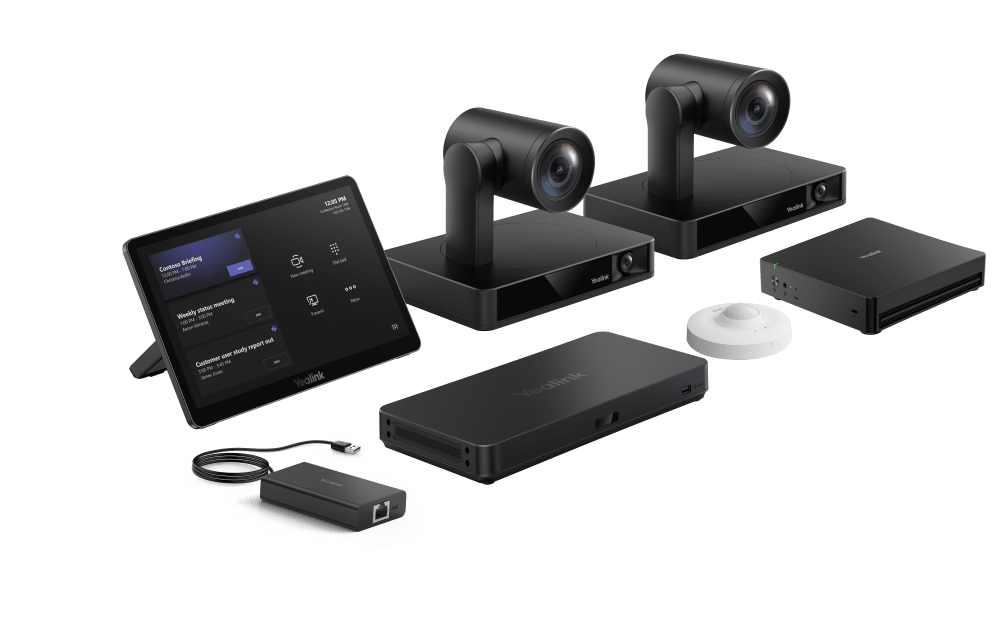
The Yealink MVC S90-C5U-004 is a premium Microsoft Teams Rooms system built specifically for extra-large conference rooms and boardrooms. It delivers professional-grade video conferencing with multiple 4K intelligent cameras, powerful AI processing, seamless native Teams integration, and flexible multi-camera layouts to ensure everyone is seen and heard clearly—no matter where they sit in a sprawling U-shape, boardroom, or training space.
Easy deployment via a single CAT5e cable and remote device management make this powerful system ideal for IT teams looking to simplify setup and maintenance.
Expert Summary
If you're outfitting a large executive boardroom, training auditorium, or collaborative workspace that regularly hosts 20–30 participants (or more), the Yealink MVC S90-C5U-004 delivers the coverage and intelligence you need without the complexity of piecing together separate components. Unlike single-camera solutions that leave far-end participants guessing who's speaking, this bundle uses two UVC86 4K dual-eye intelligent cameras paired with the AVHub multi-camera processor to provide wide-angle coverage, automatic speaker tracking, and smooth presenter views across the room.
Powered by the latest Intel Core Ultra 5 mini-PC (MCore 4), it handles AI workloads like Copilot in Teams Rooms with ease while maintaining rock-solid Windows 11 IoT stability. The included MTouch Plus 11.6" touch controller makes joining meetings, sharing content, and controlling cameras intuitive—even for non-technical users. Add the RoomSensor for occupancy awareness and the BYOD Extender for guest laptop sharing, and you have a future-proof Teams Room that scales with your hybrid workforce.
From our experience at The Telecom Spot, this is one of the strongest multi-camera native Teams options available for extra-large conference rooms, training spaces, and executive boardrooms.
Key Features
- Dual 4K AI Cameras with 12x Optical Zoom and Intelligent Tracking
- Powerful MCore 4 Mini-PC with Intel Ultra5 125H Processor
- 11.6” Touch Control Panel with Wired Content Sharing
- AVHub for Multi-Camera Layouts and Voice Tracking
- Native Microsoft Teams Rooms Integration
- Real-Time Environmental Display via RoomSensor
- BYOD Support for Hybrid Room Flexibility
- Remote Monitoring via Yealink Management Platform
Please see the Yealink MVC S90-C5U Datasheet for more information.
Yealink MVC S90-C5U-004 Specifications
| Parameter | Description |
|---|---|
| Package Content | • MCore 4 • MTouch Plus • RoomSensor • UVC86*2 • AVHub • BYOD-Extender |
| Preload | • Windows 11 IoT Enterprise X64 • Windows 11 IoT Enterprise License • Microsoft Teams Rooms App • Yealink RoomConnect |
| MCore 4, Gen-4 Mini-PC | • Processor: Intel Ultra5 125H • Memory: 16GB(2*8GB) DDR5 • Storage: 256GB SSD BIOS feature: • 3x HDMI video output -CEC -EDID • TPM2.0 • Kernel DMA Interfaces: • 1 x HDMI-Out 2.1 port • 2 x HDMI-Out 2.0 port • 1 x HDMI-In port • 4 x USB3.0 Type-A Port • 1 x MTouch Port (RJ-45) • 1 x LAN port for AV network • 1 x 10/100/1000 Gigabit Ethernet Port • 1 x Power Supply Port • 1 x 3.5mm headphone Port • 1 x reset port • 1 x Security Slot • WiFi: IEEE 802.11 a/b/g/n/ac/ax • Bluetooth: BT 5.2 |
| MTouch Plus | Physical Features: • 11.6-inch narrow bezel IPS display • Angle between screen and desktop (30° ~ 70°) • Adjustable angle of support frame (50° ~ 180°) Function Features: •1920 x 1080 video resolution • Support wired and wireless (with WPP30 - not currently available in USA) content sharing • Support external PD power supply to power the sharing device • Support HDMI/USB-C video input • Support desktop placement, desktop fixed, wall-mounted deployment |
| RoomSensor | • Detection angle: 120° • Adjustable detection angle: ±20° • Operating temperature: 0-40℃ • Operating humidity: 10-95% |
| UVC86 USB PTZ Camera | Camera: • 4K Sensor • 20.4 × HD zoom (12x optical, 1.7x digital) • 90° DFOV, 81° HFOV, 50° VFOV ( Telephoto lens) • 120° DFOV, 110° HFOV, 78° VFOV (Panoramic lens) • Up to 9 preset positions can be set • Horizontal rotation: 200° • Vertical rotation: 130° AI feature: • Auto-framing • Speaker tracking • Presenter tracking, support area trigger and gesture control • Multi-focus • Picture-in-picture Interfaces: • 1 x HDMI output • 1 x Yealink microphone port(RJ-45) • 1 x USB 3.0 Type-B port • 1 x USB 2.0 Type-A Port • 1 x Power Port • 1 x Security Lock • 1 x Reset Hole |
| AVHub,audio and video processor |
Interfaces: Function Features: |
| BYOD-Extender | Interfaces: • 1.5m USB2.0 Type-A cable • 1 x VCH port (RJ45) Physical Feature: • Operating humidity: 10~95% • Operating temperature: 0~40℃ • Dimension:89mm x 48mm x 17mm |
FAQs
What room size is the Yealink MVC S90-C5U best suited for?
This system is optimized for extra-large conference rooms, training spaces, and executive boardrooms.
Does this system support Microsoft Teams natively?
Yes. It comes preloaded with Microsoft Teams Rooms and offers a fully native Teams interface for easy setup and operation.
Can I connect more than two cameras?
Yes. The included AVHub supports up to 9 Yealink cameras for custom layouts and advanced speaker tracking.
Is content sharing available?
The system supports both wireless (via Yealink dongle - not currently available in USA) and wired (USB-C/HDMI) content sharing options.
How is it powered and connected?
It uses a single CAT5e cable for power and data between the MCore 4 and MTouch Plus, simplifying installation.
Can I manage the system remotely?
Yes. It supports Yealink Device Management Platform and Cloud Service for remote updates, monitoring, and configuration.