




Description
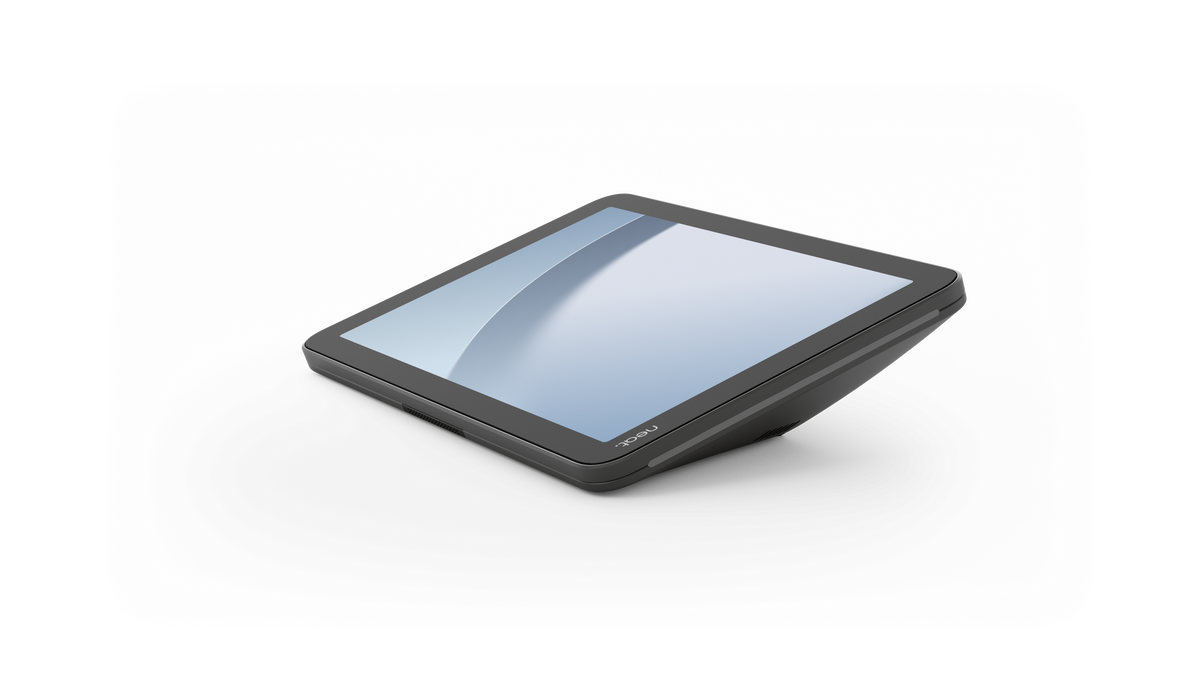
The Neat Pad Generation 2 (NEATPAD2-SE) is an 8-inch PoE touch controller and scheduling display for standardized meeting rooms. Teams use it at the table to start and manage calls, or outside the door to show whether a room is free. It runs on Neat’s P2 platform and supports Zoom Rooms, Microsoft Teams Rooms on Android as a controller, and Google Meet as a room controller. Pair it with Gen 2 and Pro front-of-room Neat devices—not first-generation Bar, Board, or Frame.
The Telecom Spot Take
Choose Neat Pad Generation 2 when you want one standard pad across everyday huddle rooms and medium conference rooms, not a premium 10-inch unit in every space. The 8-inch 1280 × 800 screen, single PoE cable, and Neat Pulse management are the specs that make a multi-room rollout simpler for IT. Buy it as a companion, not a standalone video system. You still need a compatible Neat Bar Gen 2, Bar Pro, Board 32, Board 50, or Board Pro for in-room control, and you must order a wall, glass, or side mount kit if you are not reusing a Gen 1 pad mount.
Key Features
- One device, two jobs: Use it as the in-room meeting controller or as a scheduling display outside the door so people can see availability before they walk in.
- Built for everyday rooms: Neat positions this standard-tier pad for broad deployment in huddle spaces and medium conference rooms, with Neat Pad Pro reserved for higher-visibility rooms.
- P2 platform, not a refresh of Gen 1 guts: Neat states 2–3× the processing power of Neat Pad Gen 1, with hardware meant to stay compatible with later software and platform updates.
- 8-inch anti-glare touch display: 1280 × 800 at 16:10 with anti-fingerprint coating, an ambient light sensor, and a fixed 19° viewing angle for table or wall installs.
- One cable for power and data: Gigabit Ethernet with IEEE 802.3af PoE Class 3 (mode A and B) keeps the install clean. Wi-Fi 6E and Bluetooth 5.2 are also listed. The USB-C port is for debug only.
- Table microphone that feeds the room system: One integrated microphone can extend pickup from the table. Audio is processed by the primary room device, not independently. Enable “Use Neat Pad microphones” over wired Ethernet on both the pad and the front-of-room unit (not over Wi-Fi). Official pickup is 2 m and depends on room acoustics. If the mic is on, Neat currently supports one Neat Center.
- RGB side LEDs for room status: Light bars follow the meeting platform’s colors so people can see free vs. busy from the corridor. Neat also includes a color-blindness accessibility setting.
- Workplace sensors in the pad: Temperature, humidity, and VOC index feed Neat Sense and the Neat Pulse API. There is no CO₂ sensor on Gen 2.
- Remote management with Neat Pulse: Configure, update, and monitor pads from one dashboard. Software updates can run over OTA or through Pulse.
- Mounts sold separately—and Gen 1 mounts reuse: Wall (NP2-WALL-MNT-K), glass (NP2-GLASS-MNT-K), and side/mullion (NP2-SIDE-MNT-K) kits are extra. Existing Neat Pad Gen 1 mounts work on Gen 2. No mount or PoE injector ships in the box.
Technical Specifications
| Specification | Details |
|---|---|
| Model | Neat Pad Generation 2 (Neat Pad Gen 2) |
| Product type | Meeting room controller and scheduling display |
| Brand | Neat |
| SKU / MPN | NEATPAD2-SE |
| Platform | Neat P2; NeatOS (same OS family as Neat Pad Pro) |
| Display | 8-inch diagonal, 1280 × 800, 16:10, capacitive multi-touch |
| Display coatings and sensors | Anti-glare and anti-fingerprint coating; ambient light sensor |
| Viewing angle | Fixed 19° on the table; 19° relative to the wall when used as a scheduler (71° on the wall per manufacturer mounting notes) |
| Status lighting | RGB side LED indicators; platform-defined room-status colors; color-blindness accessibility configuration |
| Orientation | 3D accelerometer / orientation sensor |
| Audio | One integrated microphone; ultrasound-capable speakers (ultrasound not supported on Microsoft Teams) |
| Microphone behavior | Processed by the primary room device; wired Ethernet required on pad and primary device to enable pad mics; official pickup 2 m; one Neat Center if mic is enabled |
| Environmental sensors | Temperature, humidity, and VOC index (no CO₂ / CO₂eq sensor) |
| Accessibility | Built-in screen reader; color correction in system accessibility settings |
| Native platform support | Zoom Rooms (controller and scheduler; Neat lists Zoom certification dated August 27, 2026); Microsoft Teams Rooms on Android as a controller (Neat lists controller certification dated July 29, 2026, with Bar 2, Bar Pro, Board 50, and Board Pro); Google Meet as a room controller |
| Scheduling notes | Zoom Scheduling App supported. Microsoft Teams Panel / scheduling support depends on MDEP (Neat: timing Q3 2026 / coming soon). Google Meet has no native scheduler; use Neat Open Apps partners. Neat Open Apps examples listed by Neat include Appspace, Comeen, Robin, GoBright, and UMA. |
| Compatible front-of-room devices | Neat Bar Gen 2, Neat Bar Pro, Neat Board 32, Neat Board 50, Neat Board Pro. Neat Board 32 Microsoft Teams controller support is listed as when MDEP is ready (timing TBA). |
| Not compatible with | Neat Bar Gen 1, Neat Board Gen 1, and Neat Frame. Neat Pad Gen 2 is not compatible with Gen 1 front-of-room devices. |
| Controllers per room | Microsoft Teams and Google Meet: 1 room controller. Zoom Rooms: multiple Neat Pad Gen 2 controllers allowed. |
| BYOD / open mode | Neat Open and third-party room apps via Neat Open Apps. Runs as a controller for a Neat Bar/Board or as a scheduler with one app at a time. Does not run multiple apps at once. Does not support device sharing or PC charging. |
| Networking | Ethernet 1.0 Gbps with PoE; Wi-Fi 6E; Bluetooth 5.2 |
| Ports | Ethernet; USB-C (debug only) |
| Power | IEEE 802.3af PoE, Class 3, mode A and B; input 56 V, 0.275 A. Optional AC / PoE adapter sold separately (POE-INJ-INT) if the switch does not supply PoE. |
| Power consumption | Idle 3.4 W; idle with screen off 2 W; in-call 3.4 W |
| Operating environment | 32° to 95° F (0° to 35° C); 10% to 90% relative humidity, non-condensing |
| Storage temperature | −4° to 140° F (−20° to 60° C) |
| Security (manufacturer-listed) | TLS 1.2/1.3; file-based encryption; 802.1X (EAP); hardware-backed secure boot; SELinux sandboxing; TEE (Arm TrustZone); hardware-backed keystore; encrypted device pairing on TCP 8443; Wi-Fi WPA/WPA2-Personal (also lists WEP/WPA) |
| Management | Neat Pulse for remote configuration, monitoring, logs, and updates; OTA updates; Neat Pulse API for facility and IT dashboards |
| Chassis | Plastic (PC-ABS) |
| Device size | 7.90 × 2.00 × 4.90 in (200 × 51 × 125 mm) |
| Device weight | 1.20 lb (0.54 kg) |
| Boxed size / weight | 9.33 × 3.03 × 6.61 in (237 × 77 × 168 mm); 2.50 lb (1.14 kg) |
| Mounting (sold separately) | Wall kit NP2-WALL-MNT-K; glass kit NP2-GLASS-MNT-K; side/mullion kit NP2-SIDE-MNT-K. Kensington-compatible security slot on the mount kits. Gen 1 pad mounts are compatible. Neat Pad Pro mount kits are not compatible with Gen 2. |
| Manufacturer MSRP | $1,090 USD for NEATPAD2-SE. Separate MSRPs listed by Neat: wall mount $100; glass or side mount $175. |
| Package contents | Neat Pad Generation 2; 2 mm hex key; 9.8 ft (3 m) Ethernet cable; warranty book. No mount and no PoE power adapter in the box. |
Comparison at a Glance
Figures below are from Neat’s published Gen 2, Gen 1, and Pad Pro comparisons. Choose by room role, not by which row looks “better.”
| Area | Neat Pad Gen 2 | Neat Pad Gen 1 | Neat Pad Pro |
|---|---|---|---|
| Role in portfolio | Standard-tier pad for broad deployment | Prior standard pad (replaced as the standard option starting Sept. 3, 2026) | Premium-tier pad for high-visibility rooms |
| Platform / performance | P2; Neat states 2–3× Gen 1 processing power | P1 | P2; Neat states up to 4× Gen 2 processing power |
| Display | 8-inch HD, 1280 × 800, 16:10 | 8-inch, 1280 × 800 | 10.1-inch Full HD, 1920 × 1200, 16:10 |
| Microphones / audio | 1 mic | 2 mics | 2 mics with built-in AI audio processing; can mix with the front-of-room device |
| Ethernet / PoE | 1.0 Gbps; IEEE 802.3af Class 3 | Standard Ethernet; IEEE 802.3at PoE+ Class 4 | 2.5 Gbps; IEEE 802.3af Class 0 |
| Wi-Fi | Wi-Fi 6E | Older Wi-Fi standard | Wi-Fi 6E |
| Sensors | Temperature, humidity, VOC | Temperature, humidity, CO₂eq, VOC | Same sensor set as Gen 2 (no CO₂) |
| Viewing angle | Fixed 19° | 14° | Multi-angle 15° / 35° |
| Mounts in the box | None; kits sold separately | Wall and side included; glass sold separately | Multi-bracket included; side and glass sold separately |
Frequently Asked Questions
Will Neat Pad Generation 2 work with my existing Neat Bar or Board?
Only if that front-of-room device is Gen 2 or Pro. Neat lists support with Neat Bar Gen 2, Neat Bar Pro, Neat Board 32, Neat Board 50, and Neat Board Pro. It does not work with Neat Bar Gen 1, Neat Board Gen 1, or Neat Frame. When you swap a Gen 1 pad for Gen 2, Neat says you must reset the paired Bar as well.
Does it support Zoom, Microsoft Teams, and Google Meet?
Yes, with role limits. Zoom Rooms: controller and scheduler (Neat lists full Zoom certification dated August 27, 2026). Microsoft Teams: certified as a controller with listed Gen 2/Pro Bars and Boards; Teams scheduling/panel support is listed as coming with MDEP. Google Meet: native room controller; scheduling goes through Neat Open Apps, not a native Google scheduler. Ultrasound speakers are not supported on Teams.
What is in the box, and what do I still need to buy?
The carton includes the pad, a 2 mm hex key, a 9.8 ft (3 m) Ethernet cable, and a warranty book. It does not include a mount or a PoE power adapter. Order NP2-WALL-MNT-K, NP2-GLASS-MNT-K, or NP2-SIDE-MNT-K if you need a new mount. If your switch cannot supply IEEE 802.3af Class 3 PoE, add the Neat PoE adapter (POE-INJ-INT). Gen 1 pad mounts can be reused on Gen 2.
How many pads can one meeting room use?
Microsoft Teams and Google Meet support one room controller. Zoom Rooms can use more than one Neat Pad Generation 2 as controllers. As a scheduler, the pad runs one scheduling app at a time. Gen 2 and Pad Pro can share the same Neat Pulse deployment if you mix standard rooms and premium rooms.
Does the built-in microphone replace a table or ceiling mic?
It can extend pickup from the table in a small to midsize room, but it is not an independent DSP mic like Neat Pad Pro. Audio is processed by the primary room device. Turn on “Use Neat Pad microphones” only when both the pad and the front-of-room device have wired Ethernet. Official pickup is 2 m and varies with room acoustics. Neat still points larger or harder rooms toward Pad Pro or dedicated Neat audio hardware.
How is Neat Pad Generation 2 different from Neat Pad Pro?
Gen 2 is the 8-inch standard pad for many rooms. Pad Pro is the 10.1-inch premium pad with a Full HD screen, dual mics and on-device audio processing, a recycled-aluminum chassis, multi-angle mounting, and 2.5 Gbps Ethernet. Both run P2 and do the same core control and scheduling jobs. Buy Gen 2 to standardize everyday rooms; buy Pad Pro when the room needs the larger display and stronger onboard audio.