


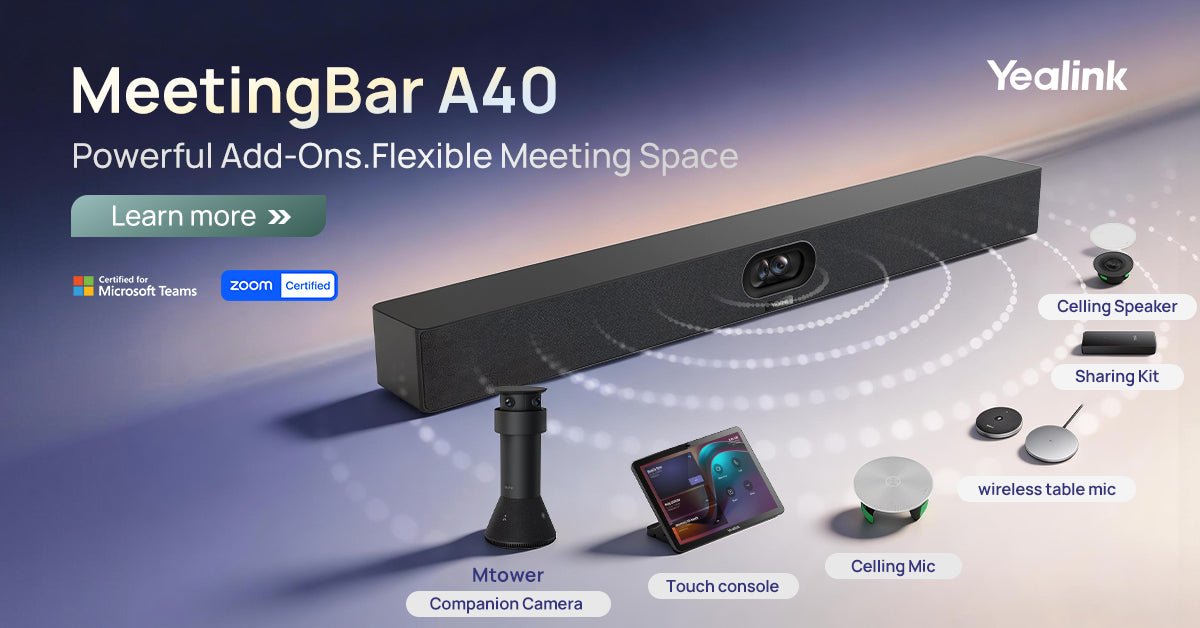
Some meeting rooms start with a simple setup. A team needs a camera, microphone, speaker, display connection, and an easy way to join video meetings.
But as the room gets larger or the way people use the space changes, that basic setup may not be enough. You may need better audio pickup, more speaker coverage, easier content sharing, or a camera view that captures the room more clearly.
The Yealink MeetingBar A40 with CTP25 is designed to work as a clean all-in-one starting point, while also supporting add-ons for rooms that need more flexibility over time.
When a Simple A40 Setup May Be Enough
For many small to medium meeting rooms, depending on layout and coverage needs, a standard A40 setup can provide a cleaner and easier experience than managing separate cameras, microphones, speakers, and cables.
- Small to medium conference rooms
- Huddle spaces
- Shared rooms with straightforward seating layouts
- Rooms where users want a cleaner all-in-one setup
- Spaces where meetings are usually run from one main table area
If the room is relatively simple, the goal is usually to keep the setup easy to use and avoid adding equipment that is not needed.
A40 Supports Both Native Platforms and BYOD
The Yealink MeetingBar A40 can support both native video conferencing platforms and BYOD (Bring Your Own Device) workflows. This gives teams flexibility in how they run meetings, depending on their environment and preferences.
In native mode, the A40 can run platforms such as Microsoft Teams Rooms or Zoom Rooms directly from the device. This can provide a more consistent, one-touch meeting experience for organizations that are standardized on a single platform.
At the same time, the A40 can support BYOD use, allowing users to connect their own laptop and run meetings from Zoom, Microsoft Teams, Google Meet, Webex, or other applications they are familiar with.
If you are still learning about BYOD, you can also check out our overview of BYOD meeting room setups and when they make sense.
When Your Meeting Room Needs More Coverage
Some rooms need more than the basic setup. This usually happens when the room layout, number of participants, or meeting style creates additional audio, video, or sharing needs.
- The room is longer or wider. People sitting farther from the front of the room may need better microphone pickup or speaker coverage.
- More people join from the room. Larger groups can make it harder for one built-in microphone or speaker to cover everyone evenly.
- The seating layout changes. Flexible rooms may benefit from wireless or ceiling audio options.
- Content sharing is important. Some rooms need a simple way for users to share presentations or laptop content.
- Remote participants need a better view. Some spaces may benefit from an added camera angle or better room coverage.
In these cases, the best setup is not always the simplest possible setup. It is the setup that keeps the room easy to use while still giving the right level of coverage.
How the Yealink A40 Can Expand
The A40 works as an all-in-one MeetingBar, but it can also support additional accessories depending on the room setup. This gives businesses a flexible path if the room needs grow over time.
Instead of replacing the entire system, some rooms can be improved by adding the right accessory for the specific problem, such as better audio pickup, easier meeting control, content sharing, or additional camera coverage.
Common A40 Add-On Scenarios
Not every room needs every accessory. The right add-ons depend on the room size, seating arrangement, audio pickup needs, and how people use the space.
- Touch console: Helpful when users need an easier way to control meetings from the table. Some A40 bundles may already include a touch console such as the CTP25.
- Table microphone: Useful when participants sit farther from the MeetingBar or when the table layout changes. Options may include wired or wireless microphones such as the VCM35 or VCM36-W.
- Ceiling microphone: A good option for rooms that need cleaner table space or wider audio pickup, with options such as the CM20 or CM50.
- Ceiling speaker: Helps improve room audio coverage when the built-in speaker may not be enough, with models like the CS10 or CS10-D.
- Sharing kit: Useful when content sharing needs to be simple and consistent, such as the VCH51 or VCH51 Pro.
- Companion camera: Helpful when one camera view may not capture the whole room well, with options like the MTower.
The goal is not to add more equipment just to add more equipment. The goal is to solve specific room problems while keeping the system easy for everyday users.
Note: Available models and compatibility may change over time. If you have questions about current options or what would work best for your setup, feel free to reach out and we can help review your requirements.
A40 vs. A50: When Should You Move Up?
The A40 is a strong fit for small to medium rooms that need a clean setup with room to expand. If the room is larger, more complex, or needs more advanced coverage from the start, the Yealink MeetingBar A50 may be a better fit.
For smaller huddle rooms, the Yealink MeetingBar A10 may also be worth considering. If you are comparing room sizes and model options, our Yealink MeetingBar comparison guide provides a more detailed breakdown.
You can also browse our Yealink MeetingBar collection or visit the Yealink video conferencing systems hub for more Yealink room solutions.
Need Help Planning Your Video Meeting Room Setup?
Choosing the right setup depends on your room size, seating layout, preferred platform, existing equipment, budget, and how the space is used day to day.
If you are not sure whether a standard A40 setup is enough or whether your room needs additional coverage, we can help review your requirements and suggest a practical configuration.
You can also email us at sales@thetelecomspot.com or call us at 866-369-3394 with any questions.
Common Questions About Expanding the Yealink A40
Can the Yealink A40 be used in larger rooms?
The A40 is generally best for small to medium rooms, but some rooms may benefit from additional microphones, speakers, or camera accessories depending on the layout.
Do I need all of the A40 accessories?
No. Most rooms do not need every add-on. The best setup depends on room size, seating arrangement, audio pickup needs, and whether users need easier content sharing or meeting control.
When should I add extra microphones?
Extra microphones may help when participants sit farther from the MeetingBar, when the table is large, or when the room layout changes often.
When should I consider the A50 instead of the A40?
The A50 may be a better fit for larger rooms or spaces that need more advanced coverage from the start. The A40 is often a better fit for small to medium rooms that want flexibility with room to expand.
Can you help us decide which accessories we need?
Yes. If you are planning a new room or upgrading an existing setup, we can help review the room size, layout, platform needs, and budget to recommend a practical configuration.