


Yealink MeetingBar Comparison: A10 vs A25 vs A30 vs A40 vs A50 (Which Should You Choose?)
Choosing the right video conferencing system usually comes down to room size, camera coverage, and how your team uses the space.
Yealink’s MeetingBar lineup combines the camera, microphones, speakers, and conferencing computer into a single device designed for Microsoft Teams Rooms and Zoom Rooms.
This guide compares the A10, A25, A30, A40, and A50 MeetingBars to help you quickly determine which system fits your meeting room best.
Note: Some Yealink graphics display manufacturer MSRP pricing. Actual selling prices vary. Please contact us or log in for account pricing to view your discounts.
Quick Recommendation (30-Second Guide)
If you're unsure which model fits your meeting room, we can help recommend the right setup based on your room size and layout.
Get a MeetingBar Recommendation Browse All MeetingBarsChoosing a MeetingBar by Room Size
For most organizations, room size is the easiest way to narrow down the right model. Larger rooms benefit from systems with broader camera coverage and longer microphone pickup.
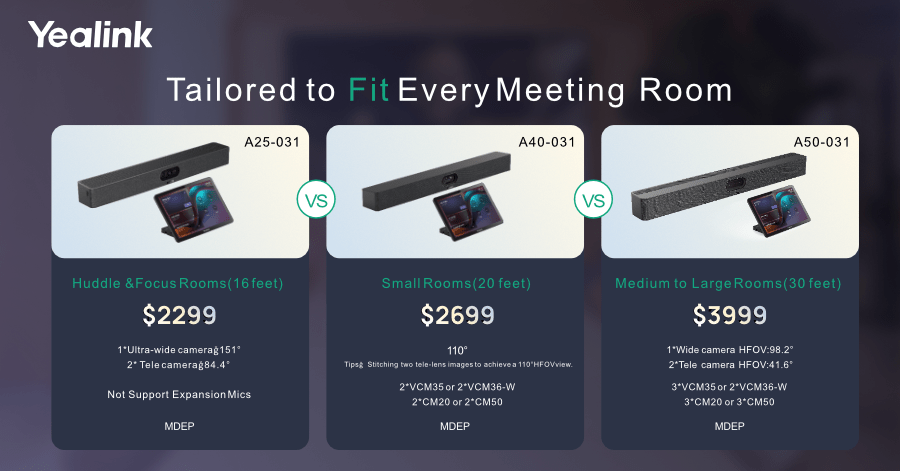
A10 vs A25: Best MeetingBars for Small Rooms

Yealink A10
- Best for home offices or focus rooms
- Compact all-in-one video bar
- Great for very small meeting spaces
Yealink A25
- Ideal for small collaboration rooms
- Triple 4K camera system
- Better coverage for active meetings
In general, the A10 works well for very small rooms, while the A25 is often the better option for shared huddle spaces where more participants need to be clearly seen.
A30 vs A50: MeetingBars for Medium Conference Rooms

Yealink A30
- Designed for medium conference rooms
- Dual camera system
- Balanced performance and value
Yealink A50
- Best for larger conference rooms
- Triple camera system for wider coverage
- Better visibility across longer tables
If your conference room is larger or has participants seated farther apart, the A50 typically provides better long-term coverage.
Why Businesses Choose Yealink MeetingBars
- All-in-one design – camera, microphones, speakers, and compute in one device
- Cleaner meeting room setups – fewer components and cables
- Native Teams and Zoom support
- Simple deployment across multiple rooms
Planning a Meeting Room?
If you're comparing Yealink MeetingBars, a few details can help quickly narrow down the right model.
- How many people sit in the room?
- How long is the conference table?
- Are you using Microsoft Teams or Zoom?
- Will the room need expansion microphones?
Share a few details about your meeting room and we can help recommend the best Yealink setup.
Request a Quote