


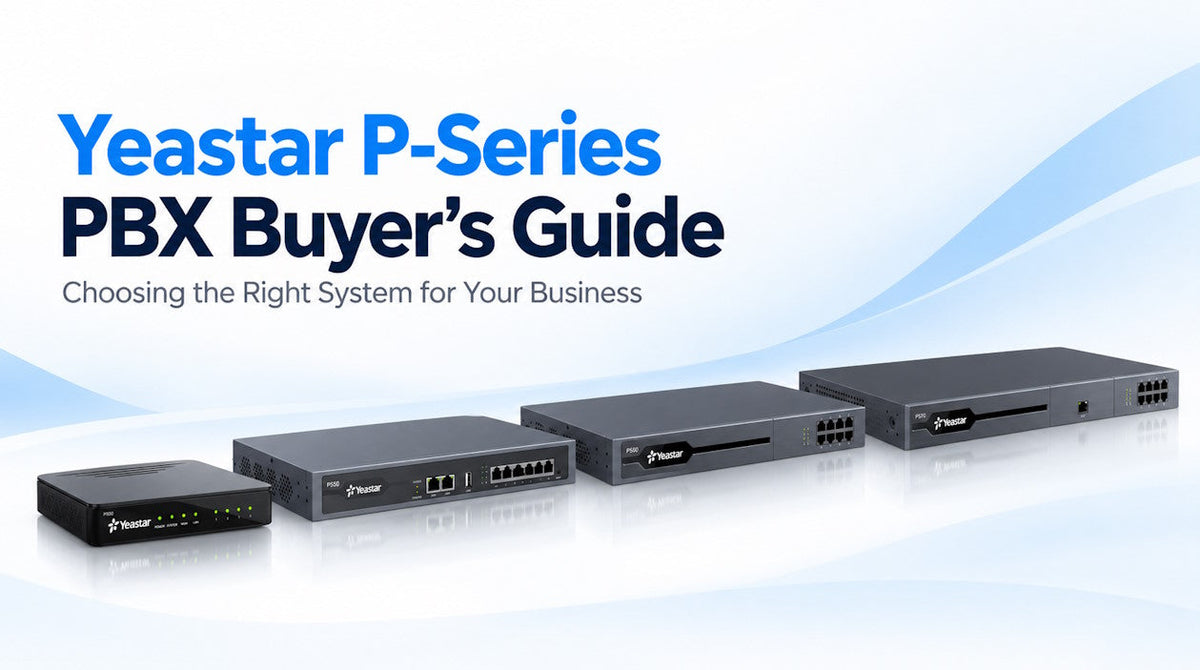
Choosing a business phone system used to be mostly about figuring out how many extensions you needed and buying a PBX large enough to handle them. The Yeastar P-Series gives businesses quite a few more choices.
Yeastar offers P-Series as a physical appliance, self-hosted Software Edition, or hosted Cloud Edition. Telecom Spot currently offers the Appliance and Software Editions, along with compatible phones, expansion hardware, and licensing.
That flexibility is one of the things we like about P-Series, but it also means there are a few decisions to make before ordering. This guide covers the main options and should help narrow down which Yeastar P-Series setup makes the most sense for your business.
Yeastar P-Series at a Glance
Yeastar introduced the P-Series platform in 2020, and it has continued to evolve with Software and Cloud editions, integrations, contact center tools, newer AI features, and Linkus for desktop, mobile, and web users.
Linkus is Yeastar's user-facing communications client. It connects employees to their P-Series extension from a computer, smartphone, or web browser, so they can make and receive business calls even when they are away from a desk phone. The apps themselves are available directly from Yeastar, while the features available through Linkus depend on the P-Series edition, plan, and services enabled on the PBX.
Today, P-Series covers the core functions you would expect from a business PBX, including extensions, SIP trunks, IVRs, call queues, voicemail, recording, and routing, with additional capabilities depending on the edition and plan. For most buyers, the real question is which deployment option, system size, and licensing level make the most sense.
First Decision: Appliance, Software or Cloud?
One of the bigger advantages of P-Series is that Yeastar does not limit the platform to a single deployment model.
P-Series Appliance Edition
Appliance Edition runs on a physical Yeastar PBX installed at your office or other location. The current lineup includes the P520, P550, P560, and P570.
This is usually the most straightforward choice for businesses that want an on-premise phone system without building and maintaining their own PBX server. The appliances can also support optional telephony modules for analog lines and devices, cellular connectivity, and, on the larger models, E1/T1/J1 connections.
Shop Yeastar P-Series PBX appliances
P-Series Software Edition
P-Series Software Edition lets you run the PBX on your own supported server or virtual environment instead of buying a dedicated Yeastar appliance.
It can be deployed in a local data center, private cloud, or supported public cloud environment. This can be a good option for businesses or IT providers that want more control over the underlying infrastructure, need more flexible capacity, or already have a virtualization or cloud environment they prefer to use.
P-Series Cloud Edition
Yeastar also offers a Cloud Edition of P-Series for organizations that want a hosted PBX without managing a physical appliance or their own PBX server.
Telecom Spot currently sells Yeastar P-Series Appliance Edition and Software Edition rather than Cloud Edition, but we include it here so buyers understand the full range of P-Series deployment options.
Which Yeastar P-Series Appliance Do You Need?
If you decide on Appliance Edition, the next step is choosing the right hardware. User count is the obvious starting point, but concurrent calls and expansion requirements matter too.
| Model | Users | Concurrent Calls | Good Fit For |
|---|---|---|---|
| P520 | 20 | 10 | Small offices that need a full business PBX without much extra capacity |
| P550 | 50 | 25 | Small to midsize businesses that need more users and telephony expansion |
| P560 | 100 base / 200 max | 30 base / 60 max | Growing organizations that need more capacity or E1/T1/J1 support |
| P570 | 300 base / 500 max | 60 base / 120 max | Larger organizations with heavier call volume and more expansion requirements |
The P560 and P570 can increase user and concurrent-call capacity with the Yeastar D30 DSP Expansion Module. Each D30 adds another 100 users and 30 concurrent calls. The P560 supports one D30, while the P570 supports up to two.
Do Not Size a PBX by Extension Count Alone
A business with 75 extensions does not necessarily have 75 people on the phone at once. At the same time, a busy customer service or sales operation may generate much more simultaneous call traffic than another company with the same number of employees.
Before choosing a PBX, look at how many users you have today, expected growth, typical simultaneous call volume, and whether you need analog, cellular, PRI, or other legacy connectivity. It is usually worth leaving some room to grow instead of sizing the system right at its limit.
Phones, SIP Trunks & Existing Equipment
Yeastar P-Series is built around SIP, so businesses can use a wide range of SIP VoIP phones and devices from manufacturers such as Yealink, Grandstream, Fanvil, Snom, and others.
Yeastar maintains an official IP phone and SIP device compatibility list covering supported phones, softphones, conference devices, paging and intercom equipment, and other endpoints. Devices that are not on the auto-provisioning list may still be able to register manually as standard SIP devices, but provisioning and individual features can vary.
The same goes for SIP trunks. P-Series gives businesses flexibility to choose their own SIP service rather than tying the PBX to a single carrier.
If you are replacing an older phone system, the modular P-Series appliances can also help bridge the gap between old and new equipment. Depending on the appliance and installed modules, P-Series can support analog phones and fax machines, PSTN lines, cellular connections, BRI, and E1/T1/J1 service.
Linkus for Desktop, Mobile & Remote Users
Linkus gives P-Series users access to their business extension from a mobile app, desktop application, or supported web browser. That means a physical desk phone is not the only way to use the system.
Depending on the P-Series edition and plan, Linkus can provide calling, presence, messaging, contacts, collaboration, and other communication tools. It is particularly useful for hybrid employees, remote staff, or anyone who needs to make and receive business calls away from their desk.
The Linkus apps themselves are available directly from Yeastar. Some advanced features and simplified remote access depend on the P-Series plan and services enabled on the PBX.
Understanding P-Series Licensing, Plans & Add-Ons
This is one area where it is worth looking beyond the hardware specifications.
P-Series Appliance Edition includes Yeastar's Basic Plan, with Standard, Enterprise, and Ultimate plans available for organizations that need additional features. Software Edition uses its own subscription structure.
Features such as advanced integrations, contact center functions, video, AI services, hotel features, and other tools can depend on the edition, plan, firmware version, or optional service.
In other words, buying a P550 or P560 tells you the system's hardware capacity, but it does not automatically tell you every software feature that will be enabled.
Because available features and add-on services can change over time, Yeastar maintains a current P-Series plans and services overview with the latest licensing options for Appliance and Software Editions.
What About Yeastar AI?
Yeastar has been adding AI features to P-Series, but the available functions are not identical across Appliance, Software, and Cloud editions.
Current P-Series features include AI tools such as text-to-speech and transcription, depending on the edition and plan. Software Edition and Cloud Edition go further with Yeastar's AI Receptionist, which can answer calls, interact with callers, use a configured knowledge base, collect information, and route calls based on what the caller needs.
One important distinction: Yeastar's full AI Receptionist is currently supported on P-Series Software Edition and Cloud Edition, not the physical P-Series Appliance Edition.
We’ll be taking a closer look at Yeastar’s AI features in a future blog, including AI Receptionist, transcription, and other tools available across the P-Series platform.
Who Is Yeastar P-Series a Good Fit For?
We think P-Series is especially worth a look for businesses that want more control over how their phone system is deployed and what equipment they use with it.
It can be a particularly good fit if you:
- Want an on-premise appliance or self-hosted software deployment
- Want to choose your own SIP phones and SIP trunk provider
- Need to support remote or hybrid employees
- Have analog, cellular, PRI, or other existing telecom connections that still need to be integrated
- Need call queues, reporting, integrations, or other tools beyond basic office calling
- Want a system that can grow without immediately replacing the entire PBX
On the other hand, a business that wants an entirely hands-off phone service may be better served by a fully managed cloud solution. There is no one PBX that is the right answer for every company, which is why we generally start with how the business works before recommending hardware or licensing.
If you are still comparing options, talk to us about what you are using now, what you need the system to do, and where you want more flexibility. We can help narrow down which type of phone system and Yeastar setup make the most sense.
Yeastar P-Series FAQ
Is Yeastar P-Series an on-premise or cloud phone system?
It can be either. P-Series Appliance Edition runs on Yeastar hardware, Software Edition can be self-hosted on supported local or cloud infrastructure, and Yeastar also offers a Cloud Edition for hosted deployments.
Telecom Spot currently offers Yeastar P-Series Appliance Edition and Software Edition. We do not currently offer Yeastar Cloud Edition.
What is the difference between Yeastar S-Series and P-Series?
S-Series is Yeastar's older PBX generation, while P-Series is the newer platform with a more modern unified communications architecture, expanded Linkus capabilities, contact center tools, integrations, and continued feature development.
If you are currently using an S-Series system, Yeastar also provides an official S-Series to P-Series migration process that can move supported settings and configurations to a new P-Series Appliance, Software, or Cloud deployment. Not every setting transfers, so it is worth reviewing Yeastar's migration documentation before planning the cutover.
What is the smallest Yeastar P-Series appliance?
The Yeastar P520 is the smallest current P-Series appliance, supporting up to 20 users and 10 concurrent calls. The Yeastar P550 increases that to 50 users and 25 concurrent calls.
What is the difference between the P560 and P570?
The Yeastar P560 starts at 100 users and 30 concurrent calls and can expand to 200 users and 60 calls. The Yeastar P570 starts at 300 users and 60 concurrent calls and can expand to 500 users and 120 calls. The P570 also provides additional room for telephony expansion.
How do I expand the user capacity on a P560 or P570?
The P560 and P570 support the Yeastar D30 DSP Expansion Module. Each D30 adds 100 users and 30 concurrent calls. The P560 supports one D30 for up to 200 users and 60 concurrent calls, while the P570 supports up to two D30 modules for a maximum of 500 users and 120 concurrent calls.
Can I use my existing IP phones and SIP devices with Yeastar?
In many cases, yes. Yeastar P-Series works with a wide range of SIP devices, including desk phones, softphones, conference phones, paging and intercom devices, and other SIP endpoints from manufacturers such as Yealink, Grandstream, Fanvil, Snom, and others. Yeastar maintains an official IP phone and SIP device compatibility list where you can check supported models and auto-provisioning options.
Devices that are not on the auto-provisioning list may still be able to register manually as standard SIP devices, but provisioning and individual features can vary. We recommend checking your existing models before planning a migration.
Can I keep my existing SIP trunk?
In many cases, yes. Yeastar supports a wide range of SIP trunk providers and also allows manually configured SIP trunks. Compatibility and account requirements should still be confirmed with your provider.
Can I reuse analog lines, analog devices, or T1/PRI service?
Yes, with the appropriate P-Series appliance and telephony modules. FXS ports can connect analog phones or fax machines, while FXO ports can connect traditional PSTN lines. The P520 and P550 accept supported telephony modules directly, while the larger P560 and P570 use the Yeastar EX08 Expansion Board for analog, BRI, and cellular modules.
For E1/T1/J1 or PRI connections, the P560 and P570 support the Yeastar EX30 Expansion Board. The P560 supports one E1/T1/J1 port, while the P570 can support up to two.
Does Yeastar P-Series support Microsoft Teams?
Yes. Yeastar provides Microsoft Teams integration that allows users to access Linkus and make and receive PBX calls through the Teams client. Requirements vary by P-Series edition and firmware. For Appliance Edition, Yeastar currently requires the Enterprise or Ultimate Plan.
Does Yeastar P-Series require a subscription?
It depends on the edition and features you need. Appliance Edition includes a Basic Plan, with additional paid plans and services available. Software Edition uses subscription licensing.
Does Yeastar P-Series have an AI receptionist?
Yes, but currently the full Yeastar AI Receptionist is available with P-Series Software Edition and Cloud Edition rather than the physical Appliance Edition. Other AI-related features are available on Appliance Edition depending on the plan and service.
Can I move an existing business phone system to Yeastar?
Yes. The exact migration process depends on your existing PBX, phones, SIP trunks, extensions, call routing, and other configuration. Yeastar provides migration tools for certain platforms, while other systems may require a more manual migration. Planning the move before cutover is especially important if you want to reuse existing phones or telecom services.
Need Help Choosing a Yeastar P-Series PBX?
Not sure whether you need a P520, P550, P560, P570, or a Software Edition deployment? We can help you narrow down the right Yeastar setup based on your users, call volume, licensing needs, existing phones and SIP devices, and other business requirements.
Call 866-369-3394 or email sales@thetelecomspot.com for help with Yeastar PBX hardware, Software Edition licenses, compatible SIP devices, add-ons, and project quotes.